Hey there, it’s Jake from the Cabinet LED Driver team here—you know, the folks who’ve spent the last five years helping cabinet installers, small contractors, and even DIY homeowners stop stressing about wonky LED strip lighting. I get it, I’ve heard it all: “Why won’t these strips turn on?” “Did I fry the driver? The strip? Both?” Trust me, I’ve fielded enough of these calls to know that connecting a cabinet LED driver to LED strips sounds like a tiny, easy task… until you’re holding a spool of 2835 strip, a driver with no labeled terminals, and half the cabinet you were wiring is now sitting in a pile on the garage floor. Cabinet LED Driver
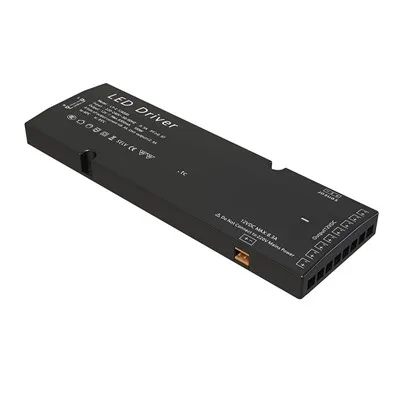
Today, I’m breaking this down step by step—no confusing jargon, no fancy tech terms you have to Google mid-project, and a few tricks I’ve picked up from working with installers who do 10+ cabinet lighting jobs a week. This is stuff you can actually use, whether you’re swapping out old lights in your kitchen cabinets or prepping 50 units for a multi-family build. Let’s dive in.
First, let’s get one thing straight: the driver is the unsung hero here. LED strips don’t run on standard wall power (that 120V or 240V from your outlet) — that’s way too much voltage, and it’ll burn through your strips in minutes. The driver’s job is to convert that high-voltage AC power from your wall into low-voltage DC power that LED strips need, usually 12V or 24V. Pick the wrong driver, and you’re either dealing with flickering lights that die in six months or a fire hazard (I’ve seen that too—never skimp on driver quality, guys).
Before we touch any wires, stop. Safety first. These are low-voltage circuits, so the shock risk is basically zero, but messing with exposed AC wires can hurt you. Flip the circuit breaker for the cabinet area off—seriously, do this first. I always keep a little label on my toolbox that says “CHECK BREAKER” so I don’t skip it. Next, gather your supplies: your cabinet LED driver, the LED strip (make sure it matches the driver’s voltage—12V strips need 12V drivers, 24V need 24V, this is non-negotiable), wire strippers, wire nuts or a terminal block (I’m a huge fan of terminal blocks for cabinet work—they stay secure, no loose wires wiggling free from cabinet vibration), and maybe a little electrical tape just in case. Oh, and if your strip has a cut line, mark that beforehand so you don’t cut it too short or uneven.
Wait, let’s talk voltage matching for a second because this is where most people mess up. Last year, I had a guy call me panicking because he’d bought a “cheap bulk driver” from a big-box store and plugged a 24V strip into it—all his under-cabinet lights died before he even finished wiring them. The rule is simple: voltage has to match. But there’s a second rule for longer runs: wattage. Each foot of LED strip uses a certain amount of power—usually 4.8W per foot for standard strips, 12W for high-brightness ones. Add up the total watts of all the strips you’re running, and pick a driver that’s at least 20% higher than that total. Why? Because if you run the driver at 100% capacity all the time, it overheats and dies. For example, if you’re running three 6-foot strips (total 18 feet) of 4.8W per foot, that’s 86.4W total. So grab a 100W driver, not an 80W one. Trust me, that extra 20% will extend the life of both the driver and your strips by years.
Okay, now we’re ready to wire. Let’s start with the driver’s terminals—every good cabinet LED driver has four clearly labeled terminals on the input and two on the output. Wait, input vs output: input is where you connect the wall power (AC, high voltage), output is where you connect the LED strips (DC, low voltage). That’s another common mix-up—don’t plug wall wires into the output side, I’ve seen that too.
First, the input side. On most drivers, the input terminals are labeled L, N, and GND. L is line (that’s the hot wire from your breaker), N is neutral, and GND is ground (the bare copper wire). Strip about ¼ inch of insulation off each of these three wall wires. Now, connect the L wire to the terminal marked L on the driver, N to N, GND to GND. Tighten the terminal screws until the wires are snug—don’t over-tighten, you’ll strip the terminal and have a loose wire. If you’re using terminal blocks instead of direct connection, just push the stripped wires into the appropriate slots and tighten the set screw.
Next, the output side. This is where we connect the LED strips. The output terminals are almost always labeled + and – (plus and minus). This is critical—get these backwards, and the strip will either not turn on or flicker like a bad disco light. No permanent damage, but it’s a pain to rework. The LED strips themselves have little markings too: on the back, near the connector pads, you’ll see a + symbol and a – symbol, or sometimes just the positive pad is marked with a small line or red dot.
Here’s how to connect the strip to the driver’s output. Most LED strips come with a short, 2-wire pigtail that you can solder or connector to the strip’s pads, but if you’re using a connector that clips on, that’s even easier—no soldering required, which is perfect for DIYers. If you don’t have a pigtail, strip about ½ inch of insulation off the two ends of the strip’s connector wires. Now, match the colors: usually, red is positive (+) and black is negative (-), but don’t rely on color alone—check the strip’s markings. Connect the red (positive) wire to the driver’s + terminal, and black (negative) to the – terminal. Tighten those down, and that’s the core connection.
Wait, but what if you have multiple strips? A lot of cabinet installs have two strips per cabinet, or multiple cabinets strung together. Here’s the right way to do parallel vs series wiring—never wire LED strips in series, that’s a rookie move. Series means you connect the first strip’s negative to the second strip’s positive, and so on—this is for string lights, not LED strips. If you do that, the voltage drops across the strips, and the last one will be dimmer than the first. For multiple strips, use parallel wiring: connect all the positive pads of each strip to the driver’s + terminal, and all the negative pads of each strip to the driver’s – terminal. That way, each strip gets the full voltage, and they’re all equally bright. Just make sure your driver’s total wattage can handle all the strips combined, like we talked about earlier. If you have a really long run (over 15 feet), you can even add a second driver midway through the strips to prevent voltage drop—ask our team, we can help calculate that for free, no pressure.
Now, let’s talk mounting, because wiring isn’t just about connecting wires—you have to secure everything so it doesn’t come loose inside the cabinet. I always recommend mounting the driver outside the cabinet, if possible, like in the toe kick or above the upper cabinets. Cabinets get hot, and drivers don’t like heat—excess heat is the number one cause of driver failure. If you have to mount it inside the cabinet, leave at least an inch of space around it for airflow, and don’t tape it to the bottom of the cabinet where it’s sitting on wood or insulation. Use mounting brackets (we sell low-profile ones for cabinet installs) or small screws to secure it to a empty back panel.
Also, wire management. No one wants a mess of wires hanging out inside a new cabinet. Use cable clips or wire raceways to tuck the input and output wires neatly along the cabinet walls. Make sure no wires are pinched between the cabinet doors when they close—crushing a wire will cut power or cause a short. I learned that lesson the hard way when a customer’s cabinet door pinched a wire during installation, and they called me a week later because their lights turned off every time they opened the door. Oops.
Okay, time to test. This is the fun part, after all that wiring. Flip the circuit breaker back on. Wait a second, don’t just yell “YAY” yet—check for flickering, dimming, or any strange buzzing. A small amount of buzzing is normal for high-wattage drivers, but if it’s loud enough to hear from across the room, you probably have a bad driver or loose wire. If the lights work perfectly, great! If not, troubleshoot step by step: first, make sure the breaker is on, then check that the input wires are connected correctly, then double-check the output + and – connections (I can’t stress this enough—90% of connection issues are backwards polarity), then check that the voltage matches and your wattage is sufficient.
Now, a few pro tips from the team here at Cabinet LED Driver that we’ve picked up over thousands of installs. First, use waterproof rated drivers if your cabinets are in a damp area, like a bathroom or kitchen near the sink. Standard drivers will short out if exposed to moisture, and we have IP65 rated drivers made exactly for that. Second, always cut your LED strip at the marked cut lines—those are designed to handle the current, and cutting anywhere else will damage the circuit board and cause the strip to fail. Third, if you’re using a dimmer, make sure it’s rated for LED drivers, not incandescent dimmers. Incandescent dimmers can cause flickering or even damage to the driver. We have a line of dimmers specifically calibrated for our cabinet drivers, so just ask if you need a recommendation.
Wait, let’s address a common question I get all the time: can I use any LED driver for my cabinet strips? The short answer is no. Cheap, unregulated drivers from big-box stores have inconsistent voltage, which will cause your strips to dim over time, flicker, or die prematurely. Our cabinet LED drivers are specifically designed for low-profile, cabinet-mounted lighting—they’re compact for tight spaces, energy-efficient, and have built-in over-voltage and over-heat protection, so you don’t have to worry about them frying your strips. We’ve tested 100+ different strip types, so if you tell us what strips you’re using, we can match you with the exact driver you need.
I’ve seen too many homeowners and installers cut corners here, and it always leads to headaches later. Last month, a contractor came to me with a mess: he’d used a generic driver for 20 kitchen cabinets, and half the strips were dead within three months. He’d spent $500 on replacements, plus labor to rewire, because he’d skipped matching voltage and wattage. Don’t be that guy.
At the end of the day, connecting a cabinet LED driver to LED strips isn’t rocket science—it’s just following a few simple rules, taking your time, and using the right parts. It’s way better to spend an extra 10 minutes getting the connections right than to have to take apart a whole cabinet a month later to fix a mistake.
If you’re working on a project and aren’t sure what driver to get, or you’re stuck on a wiring question, our team is here to help. We don’t do pushy sales pitches—we just want to make sure your cabinet lights work perfectly, for years. Whether you’re a DIY homeowner doing a small kitchen remodel or a contractor with a multi-unit build, we can help you pick the right driver, walk you through the wiring step by step, or even send you free samples to test. Just reach out whenever you’re ready to chat.
Happy wiring, and here’s to bright, flicker-free cabinet lights for all your projects.
Wired Sensor Switch References:
- LED University. (2021). LED Driver Basics: Voltage, Current, and Power Requirements. Lighting Research Center, Rensselaer Polytechnic Institute.
- National Electrical Code (NEC). (2020). Article 410: Lighting Systems. National Fire Protection Association.
- Solid State Lighting Industries Association (SSLTA). (2022). Best Practices for Low-Voltage LED Strip Installation. SSLTA Technical Bulletin No. 12.
Dongguan Lanbaoli Intelligent Technology Co., Ltd.
As one of the most professional cabinet led driver manufacturers and suppliers in China, we’re featured by quality products and low price. Welcome to buy advanced cabinet led driver for sale here from our factory. If you have any enquiry about quotation, please feel free to email us.
Address: 10th Floor, Building 32, Golden Town, No. 7 Technology Avenue, Houjie Town, Dongguan City, Guangdong Province
E-mail: anna@lampow.cn
WebSite: https://www.lblsensor.com/
