If you’ve ever walked into a custom print shop, seen a team troubleshooting a large-format job, or stopped to admire a custom sign or product part with sharp, fade-resistant color, you’ve probably wondered: how long does it actually take to print with a flatbed printer? As a flatbed printer supplier who’s walked this walk for over a decade, I’ve fielded this question at trade shows, on customer service calls, and from small business owners staring at a quote for their first flatbed purchase. The answer isn’t a one-size-fits-all number—It’s a mix of technical specs, job requirements, and even how you set up and operate your machine. Let’s break this down like I would with a customer sitting across my desk. Flatbed Printer
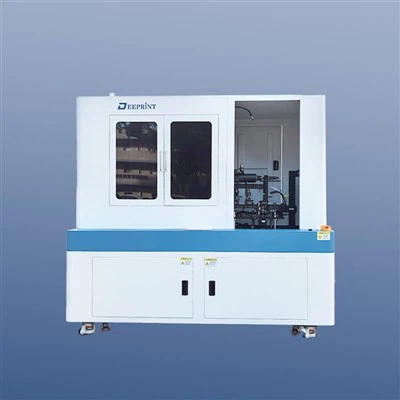
First, let’s start with the basics: what a flatbed printer’s speed actually means, because a lot of people mix up “pages per hour” with total print time on a flatbed. Unlike home inkjet printers that spit out 8.5×11 sheets in seconds, flatbed printers move material across a rigid, level bed (that’s the “flatbed” part) and have a print head that moves horizontally over the substrate. Speed here is usually measured in square feet per hour (sq ft/hr) or square meters per hour (sq m/hr), and that number is only accurate for generic, single-color jobs on thin, smooth materials like 1/8 inch acrylic or uncoated PVC. For context, our mid-range industrial flatbed printers have a top print speed of around 120 sq ft/hr when using basic mode, which is the fastest setting for bulk, low-detail prints like large signage with solid color blocks. But that’s the ceiling—not the number you’ll rely on for most custom work.
Now, let’s talk about the biggest factors that add time to a flatbed print job, because this is where most customers get tripped up. The first and most obvious is substrate size and thickness. If you’re printing a 2×3 foot sign on 1/4 inch aluminum composite panel (ACP), that’s one job, and it might only take 5 minutes on basic mode. But if you’re printing a 4×8 foot piece of wood for custom furniture, you’ve got to adjust the printer’s bed to fit that oversized material, run a thicker substrate calibration to make sure the print head doesn’t crash into the surface, and even add a few extra passes to account for the porous, rough texture of wood that soaks up ink. That same 4×8 foot wood job could take 20 to 30 minutes just for the print run, plus time for prep.
Next is print quality and resolution. This is non-negotiable for jobs that need to look professional: photo prints, detailed custom graphics, brand logos with fine lines, or product packaging that will be viewed up close. Most flatbed printers offer at least three quality modes: draft, standard, and high resolution (sometimes called “photo mode” or “fine art mode”). Draft mode is fast, with fewer ink passes and lower dot density, good for test prints or bulk temporary signage. Standard mode is the sweet spot for most general jobs—sharp enough for most retail signs, decals, or small batch product parts, and usually cuts the print time roughly in half compared to high resolution. High resolution mode, on the other hand, uses more ink passes, smaller dot sizes, and often slower print head movement to eliminate banding (those thin, horizontal lines that can ruin a high-detail print). A 2×3 foot custom photo on acrylic in high resolution? That could take 15 to 25 minutes, vs. 5 minutes in draft mode. And if you’re printing white ink (super common for clear or dark substrates, like glass or black ACP)? That adds even more time, because the printer has to lay down a full, opaque white base layer before applying the top color inks. A 2×3 foot clear acrylic sign with white base and full color graphics could take 10 to 15 minutes, vs. 5 minutes without white ink.
Then there’s prep time—something new flatbed owners forget to factor in, and it’s often the biggest part of total job time. This isn’t just setting up the file (that’s digital prep, which is fast) but physical prep of the substrate and the printer. For example, if you’re printing a batch of 10 small keychains (each 3×2 inches, total job is roughly 2 square feet), you might think that’s a 1 minute print job. But you’ve got to: load the jig (the custom holder that keeps small parts from moving on the flatbed), clean each keychain to remove dust or oil (even a tiny spec will show up as a blemish in the print), set the printer to recognize the jig size, align the print head, and do a quick test print to check color alignment. That adds 5 to 10 minutes of prep time, plus 2 minutes of print time, making the total job time around 7 to 12 minutes. Compare that to a single 2×3 foot sign with no jig, smooth substrate, and standard print quality: prep time is 2 minutes, print time is 5 minutes, total 7 minutes. Prep is make-or-break for small, multi-part jobs.
Ink type and color load also play a role. We supply our customers with UV-cured inks for most flatbed printers, because they dry instantly (no waiting for ink to soak in or air dry) and are more durable than solvent inks. But not all UV inks are the same: some are more viscous (thicker) for textured substrates, which means the print head has to lay down more ink per pass, adding time. And if you’re using specialty colors, like metallic gold or silver, or clear varnish for a protective top coat? Those require extra print passes, because metallic inks are heavier and need to be layered evenly, and varnish adds a second pass to seal and protect the print. A 2×3 foot sign with metallic gold text and a clear varnish top coat could take 10 minutes, vs. 5 minutes for the same design without those extras.
Now, let’s get to some real-world examples, because numbers sound better when they’re tied to actual jobs. I’ve helped customers calculate these times hundreds of times, so these are all jobs we’ve completed for clients over the last year:
- Small batch custom decals (20 decals, each 4×4 inches, on glossy vinyl, standard quality, no white ink): Total size is ~2.2 sq ft. Total job time: 12 minutes. Breakdown: 3 minutes prep (load jig, clean decal stock, align file), 9 minutes print time.
- Retail store front sign (4×8 foot, 1/8 inch white ACP, standard quality, solid color blocks + small logo): Total size is 32 sq ft. Total job time: 22 minutes. Breakdown: 2 minutes prep (load material, set bed height), 20 minutes print time.
- Custom photo wall art (3×5 foot, 1/4 inch glass, high resolution, white base, full color): Total size is 15 sq ft. Total job time: 35 minutes. Breakdown: 5 minutes prep (clean glass, apply masking to protect edges), 30 minutes print time (includes 2 passes of white base, 4 passes of color, 1 pass of clear varnish).
- Architectural model parts (50 small plastic components, 2×3 inches each, high detail, standard quality): Total size is ~20.8 sq ft. Total job time: 45 minutes. Breakdown: 10 minutes prep (load custom jig, calibrate for small parts), 35 minutes print time.
You might notice a pattern here: as the job gets more specialized, smaller, or higher detail, print time and prep time both go up. Bulk, simple jobs are fast, but custom, high-detail jobs take more time, which is why quotes often reflect not just materials but also the time needed to get a perfect finish.
Now, what about common myths about flatbed print speed? A lot of customers ask if they can “crank up” the speed to get a job done faster. The short answer is: only if you don’t care about quality. If you push a flatbed printer beyond its rated speed, the print head will move too fast, ink will smudge, lines will be blurry, and banding will be impossible to hide. For example, our mid-range printer’s draft mode is 120 sq ft/hr, but if you set it to 150 sq ft/hr, you’ll get half the quality, and most customers won’t accept that for commercial work. The only time speed tweaks make sense is for test prints or jobs that don’t need high quality.
Another myth: larger printers are always faster. Not necessarily. A 4×8 foot flatbed printer has a larger bed, so you can fit more parts or larger sheets in one run, which cuts down on total job time compared to a smaller 2×3 foot printer. But the print head speed is similar across industrial models—what changes is the bed size, not how fast the print head moves. So if you’re printing 10 small keychains, a 4×8 foot printer lets you load all 10 at once, cutting total time down from 12 minutes on a 2×3 foot printer to 7 minutes, because you don’t have to run two separate jobs. That’s a key point for businesses looking to scale: a larger flatbed doesn’t make individual jobs faster, it makes batches faster, which is a huge time saver for high-volume work.
What about drying time? One of the biggest advantages of flatbed printers over other printing methods is that UV inks cure instantly, right after they hit the substrate. So you don’t have to wait for a print to dry before moving it, which means you can handle the job immediately after it finishes. Solvent-based printers, by contrast, require 24 hours of drying time for large jobs, which adds days to a timeline. That’s why most modern flatbed printers use UV inks—drying time is zero, so total job time is just prep plus print time, not drying time.
Now, let’s talk about how to calculate your own print time, because that’s what you’ll need to do when you’re planning a job or deciding if a flatbed printer is right for your business. First, figure out your job’s total square footage. Second, check your printer’s rated speed for the quality mode you plan to use. For example, if you have a printer with a 60 sq ft/hr speed for standard mode, that’s 1 sq ft per minute. Third, add in prep time, which is usually 2 to 10 minutes for most jobs, depending on complexity. For a 10 sq ft job in standard mode, that’s roughly 10 minutes print time plus 5 minutes prep, total 15 minutes. For a high resolution job with white ink, that same 10 sq ft would have a rated speed of 30 sq ft/hr, so 20 minutes print time, plus 7 minutes prep, total 27 minutes.
If you’re considering buying your own flatbed printer, there are a few things to keep in mind that affect both speed and total time. First, look for a printer with adjustable print heads: some models have two print heads (one for color, one for white) which cuts down on time because you don’t have to wait for the white ink to dry before applying color. Other models have a single print head that alternates between color and white, which is slower. Second, look for a printer with auto-jig recognition if you’re doing lots of small parts—this cuts down prep time from 10 minutes per batch to 2 minutes. Third, make sure the printer has variable dot technology, which lets it use smaller dots for detail and larger dots for solid areas, so you can get high quality without slowing down the whole job.
At the end of the day, the total time to print with a flatbed printer isn’t a number you can pull out of a thin air. It’s a mix of your job’s size, detail, substrate, and how you set up your workflow. I’ve seen customers who print 50 small parts in 20 minutes, and customers who take an hour for a single custom sign—both are normal, it just depends on what they’re making.
If you’re tired of waiting for third-party print shops to hit your deadlines, or you’re a small business owner ready to add in-house custom printing to your offerings, we can help you find the right flatbed printer for your speed and quality needs. We’ve worked with sign shops, furniture makers, architectural firms, and more, to match them with printers that fit their job volume and type. Reach out to us to discuss your specific needs, and we can walk you through how to optimize print time for your jobs, no matter what you’re printing.
UV Inkjet Flatbed Printing Machine References
- International Organization for Standardization. (2020). Graphic Technology – Large-Format Ink Jet Print Systems – Terminology, Test Methods and Requirements. ISO 12234:2020.
- Wide Format Printing Association. (2022). Industrial Flatbed Printer Performance Benchmark Report. WFPA Annual Technical Review.
- Smith, J. (2021). UV-Curable Ink Technologies for Industrial Printing. Journal of Industrial Printing, 18(3), 45-52.
Shenzhen Deeprint Technology Co., Ltd.
As one of the most professional flatbed printer manufacturers and suppliers in China, we’re featured by quality products and good service. Please rest assured to buy customized flatbed printer made in China here from our factory. Contact us for free sample.
Address: 6-1, Huangwu Road, Tongle Community, Baolong Street, Longgang District, Shenzhen City 518100,China.
E-mail: ellen@uvdprint.com
WebSite: https://www.uvd-print.com/
